Free · Windows · Local-first

Speak your mind.
Land the right words.

TapVoice cleans up your dictation as you speak, and drafts replies grounded in whatever's actually on your screen — no more staring at a blank reply box.

Bring your own Groq / Claude API key — no subscription, no account.
F8Voice → cursor
so um I think we should ship this today
So I think we should ship this today.
Filler removedCapitalized & punctuated
F7Screen → smart reply
On screen: an empty reply box, under a real LinkedIn post about hiring senior engineers
Would love to hear more about the engineering culture — is this fully remote, or based out of a city?
Grounded in the real postNothing invented
F9Voice → AI
"what's a polite way to decline a meeting invite"
Thanks for the invite — I won't be able to make it, but happy to sync separately if useful.
Answered directly
F8
Hold, speak, release
Your words are typed at your cursor, cleaned up automatically.
F7
Hold over anything, release
A reply is drafted, grounded in what's actually on screen.
F9
Hold, ask, release
The answer is typed right where your cursor is.
Works anywhere you can type — NotepadGmailLinkedInXSlackVS CodeTerminaland more
F8Voice → cursor

Dictation that edits itself

Hold F8, speak naturally — fillers, false starts, and mid-sentence corrections included. Release, and clean, formatted text lands right at your cursor.

  • Removes "um," "like," and other filler words automatically
  • Catches corrections — say "meet at 3, actually 4pm" and get just "meet at 4pm"
  • Formats spoken lists into real numbered lists
  • Speaks 100+ languages, with optional translate-to-English
  • Never guesses your meaning — won't rewrite what you actually said
You said
"first check the logs second restart the service third notify the team"
TapVoice
1. Check the logs
2. Restart the service
3. Notify the team
Spoken list → real list
You said
"let's meet at 3pm no wait make it 4pm"
TapVoice
Let's meet at 4pm.
Self-correction resolved
F7Screen → smart reply

Never stare at a blank reply box again

Hold F7 over an email, a comment, a message — anything you need to reply to. TapVoice reads what's actually on screen, pulls in relevant context from things you've done before, and drafts a reply grounded in reality — not a generic platitude.

  • Grounded in what's really on screen — never invents facts, dates, or names
  • Recognizes people and projects you've mentioned before
  • Matches your own writing tone, learned from how you actually write
  • Works while scrolling — reads a whole article before drafting a comment
On screen
Email: "Can you send me the updated deck before Thursday's review?"
F7 drafts
Yes — I'll have the updated deck to you before Thursday's review. Let me know if there's anything specific you want covered.
Reused your actual deadlineNo made-up date
LinkedIn comment
On screen: a post announcing a colleague's promotion after leading a product launch
Congrats — well-deserved after how that launch went. Excited to see what's next.
References the real achievement
YouTube comment
On screen: a tutorial comment asking "does this still work with the latest version?"
Yes — tested it on the latest version, works fine, just update the import path.
Answers the actual question
Product Hunt comment
On screen: a comment asking whether the tool needs a subscription
It's free with your own API key — no subscription needed.
Grounded in the actual question
F9Voice → AI

Ask a question, get an answer, done

Hold F9, ask anything, release — the answer is typed right where your cursor is. Switch between Groq and Claude in Settings, whichever you'd rather use.
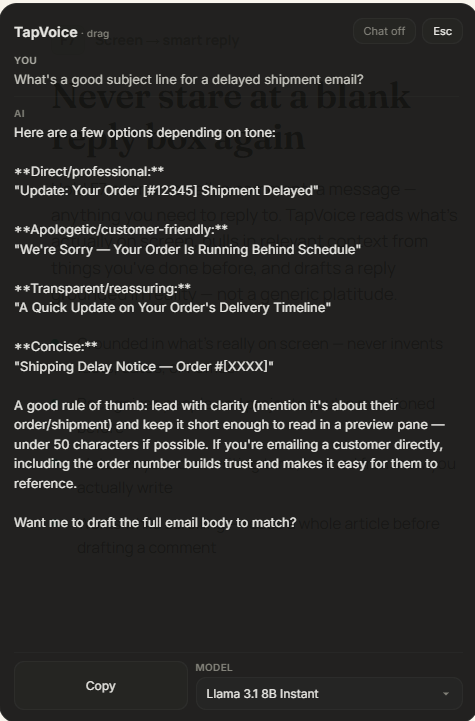
TapVoice F9 chat answering a real question about email subject lines

Your voice stays yours.

TapVoice's memory runs quietly in the background, entirely on your machine. Pause it, exclude apps, or turn it off completely — it's your call, always.

Encrypted at rest

Your local memory database is encrypted, with the key tied to your own Windows login — no password to remember, nothing sitting in plaintext.

Meaning-search stays local

Finding related past context runs on a small model on your own device — no cloud call, no API key needed for this part.

You're always in control

Pause background capture anytime, or exclude specific apps and windows from ever being remembered at all.

Say it once.
Let it land right.

Free to use with your own Groq or Claude API key. No subscription, no account required.